
Configure your payroll schedule, calculation rules, and salary components here - once set, payroll runs follow these automatically.
This is where you set up the rules behind every payroll run - when payroll happens, how salaries are calculated, and what earning and deduction components apply to your employees.
To access Payroll Settings:
Dashboard → Settings → Organization Settings → Payroll & Compensation
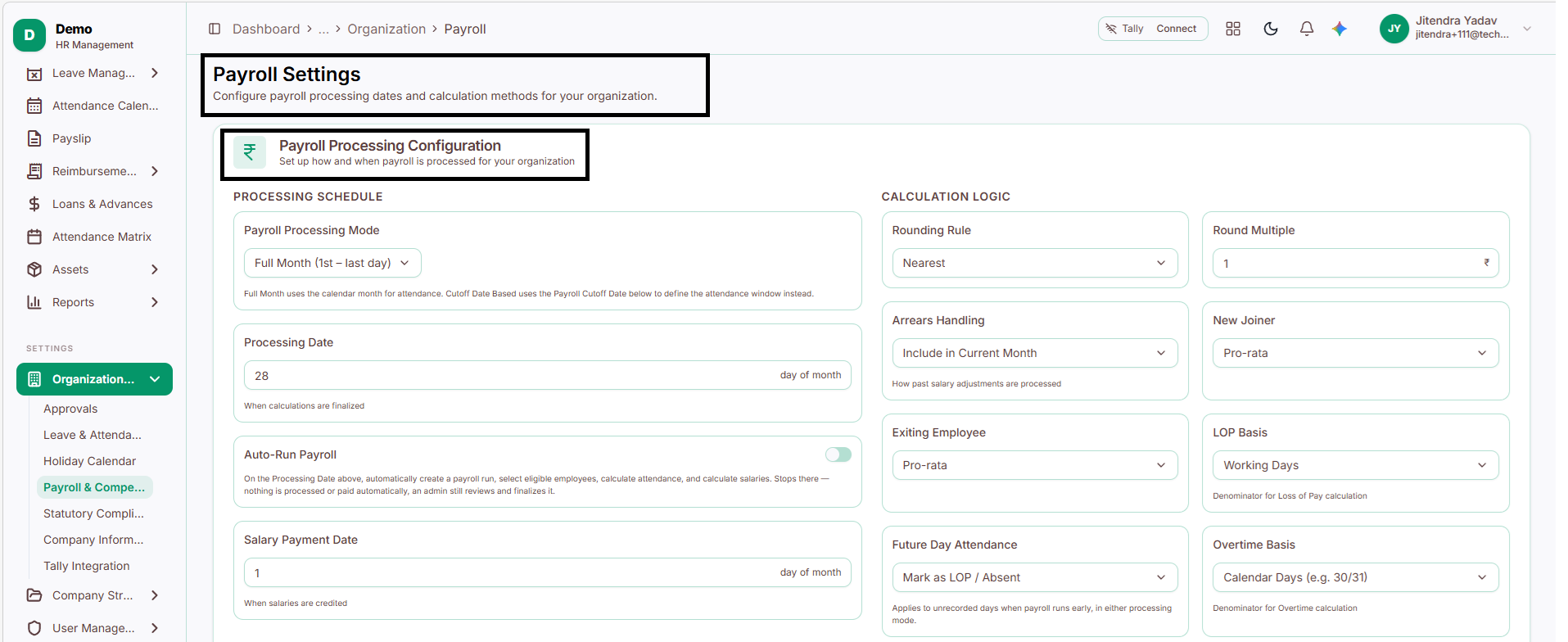
Payroll Processing Configuration
Set up how and when payroll is processed for your organization.
Processing Schedule
Payroll Processing Mode: Select the attendance period used for payroll calculations.
Full Month: Uses attendance from the 1st to the last day of the month.
Cutoff Date Based: Uses the configured Payroll Cutoff Date to determine the attendance period.
Processing Date: Defines the day of the month when payroll calculations are finalized.
Auto-Run Payroll: Automatically creates a payroll run on the Processing Date, selects eligible employees, and calculates attendance and salaries. Admins must still review and finalize payroll; payment is not processed automatically.
Salary Payment Date: Defines the day of the month when salaries are scheduled to be paid.
Calculation Logic
Rounding Rule: Determines how salary amounts are rounded, such as Nearest, Floor, or Ceiling.
Round Multiple: Specifies the multiple used for rounding. For example, ₹1 rounds amounts to the nearest rupee.
Arrears Handling: Defines how past salary adjustments are processed.
Include in Current Month: Adds arrears to the current month's payroll.
Include in Next Month: Adds arrears to the following month's payroll.
Separate Payment: Processes arrears separately from regular payroll.
New Joiner: Defines salary calculation for employees joining mid-month.
Pro-rata: Pays salary proportionately for the applicable period.
Full Month: Calculates salary for the full month.
Exiting Employee: Defines salary calculation for employees leaving mid-month.
Pro-rata: Pays salary proportionately for the applicable period.
Full Month: Calculates salary for the full month.
LOP Basis: Selects the basis for Loss of Pay calculations.
Working Days: Uses the number of working days.
Calendar Days: Uses the total calendar days in the month.
Future Day Attendance: Defines how attendance days without recorded data are treated when payroll runs early.
Mark as LOP / Absent: Treats unrecorded days as absent or Loss of Pay.
Mark as Present Unless Leave Applied: Treats unrecorded days as present unless leave has been applied for.
Overtime Basis: Defines the basis for overtime calculations.
Calendar Days: Uses the total calendar days in the month, such as 30 or 31.
Working Days: Uses the number of working days in the month.
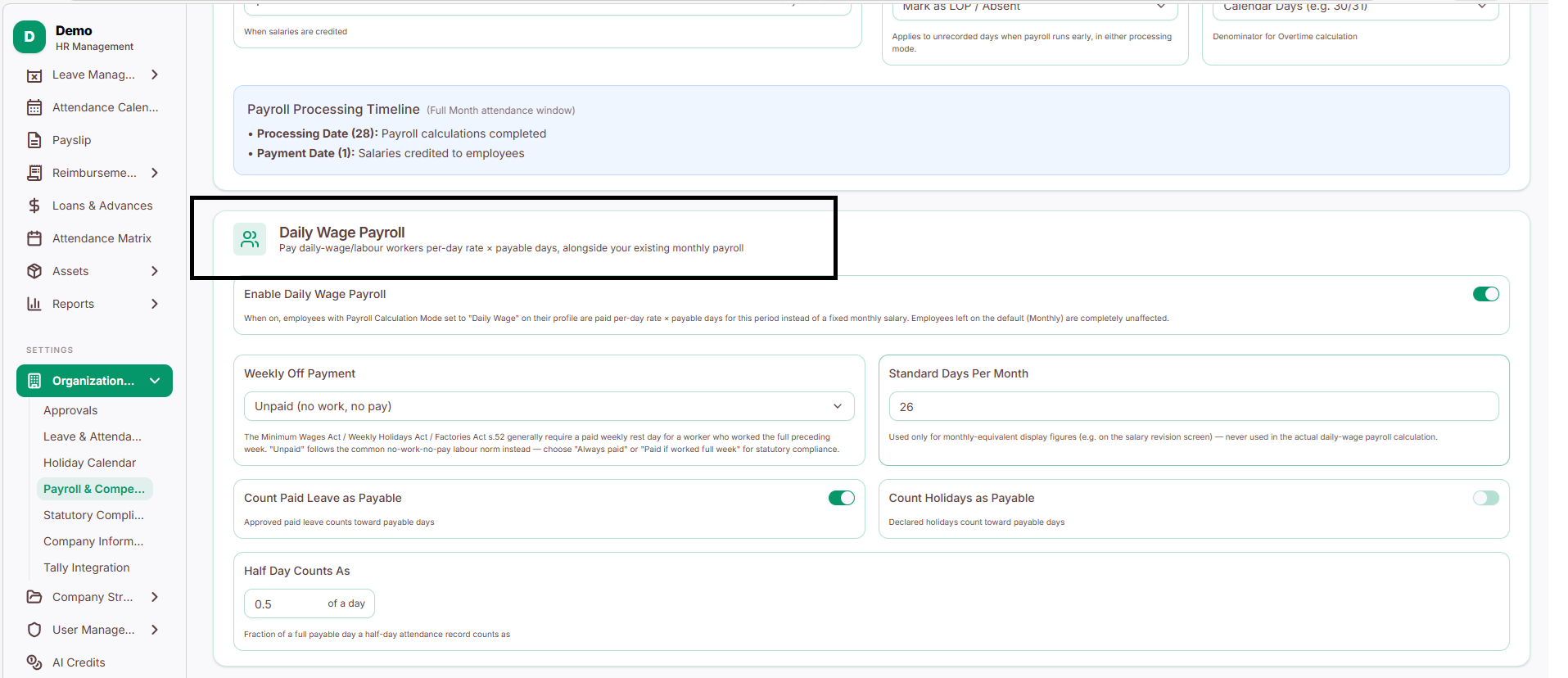
Daily Wage Payroll
Pay daily-wage employees based on their payable days and daily rate, alongside regular monthly payroll.
Daily Wage Settings
Enable Daily Wage Payroll: Enables daily-wage salary calculations for employees whose Payroll Calculation Mode is set to Daily Wage in their profiles. Their pay is calculated using the daily rate multiplied by payable days. Employees using the default Monthly mode remain unaffected.
Weekly Off Payment: Defines whether weekly off days are paid for daily-wage employees.
Unpaid: Weekly off days are not paid.
Always Paid: Weekly off days are always paid.
Paid if Worked Full Week: Weekly off days are paid only if the employee worked the full preceding week.
Standard Days Per Month: Sets the standard number of days used for monthly-equivalent display figures, such as on the salary revision screen. This setting does not affect actual daily-wage payroll calculations.
Count Paid Leave as Payable: When enabled, approved paid leave is included in payable days for daily-wage employees.
Count Holidays as Payable: When enabled, declared holidays are included in payable days.
Half Day Counts As: Defines the fraction of a full day counted for half-day attendance. For example, 0.5 counts as half a payable day.
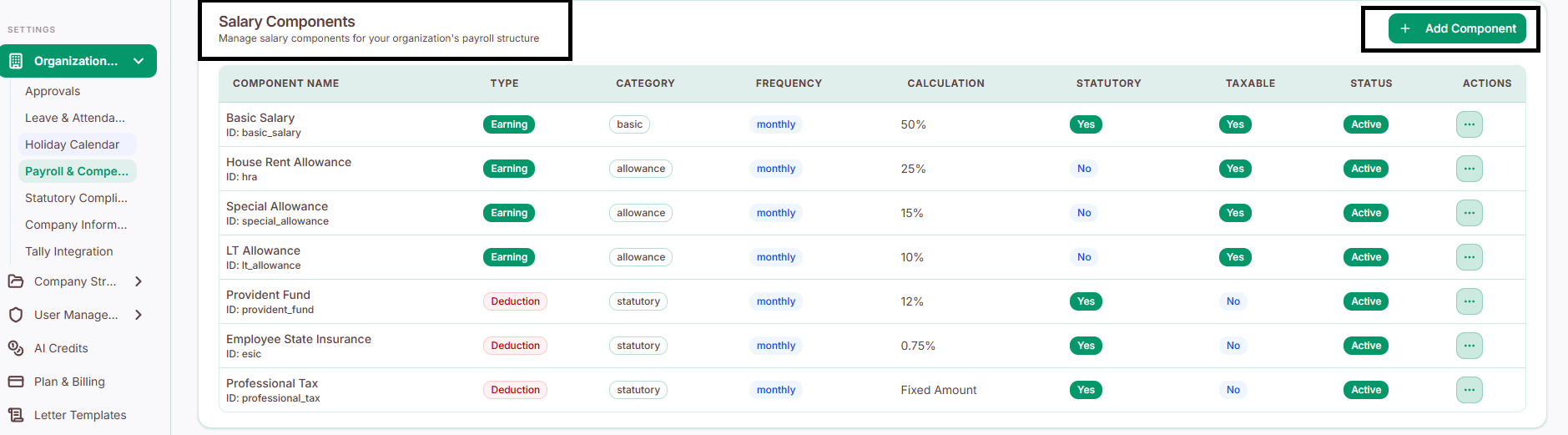
Salary Components
Manage the individual pieces that make up an employee's salary - what they earn, and what gets deducted.
Earning components
These are the parts of an employee's salary. By default, PrimeHR includes:
Basic Salary - the main taxable part of salary, 50% of total compensation
House Rent Allowance (HRA) - taxable, 25% of total compensation
Special Allowance - taxable, 15% of total compensation
LTA (Leave Travel Allowance) - taxable, 10% of total compensation
All earning components are processed monthly.
Deduction components
These are statutory (legally required) deductions, applied automatically during payroll:
Provident Fund (PF) - 12%, deducted monthly
Employee State Insurance (ESIC) - 0.75%, deducted monthly
Professional Tax (PT) - a fixed amount, deducted monthly
These are applied automatically to keep payroll compliant with statutory requirements.
Adding a new component

Navigate to Salary Components.
Click + Add Component.
Select the component type: Earning or Deduction.
Enter the Component Name and choose the calculation method, such as a fixed amount or percentage.
Set the Frequency, such as monthly.
Configure the following Component Properties using the enable or disable options:
Affects Monthly Structure: Determines whether the component is included in the employee's monthly salary structure.
Statutory Component: Identifies the component as a statutory payroll component.
Taxable: Specifies whether the component is subject to income tax.
PF Applicable: Determines whether the component is considered for Provident Fund (PF) calculations.
ESIC Applicable: Determines whether the component is considered for Employee State Insurance (ESIC) calculations.
Gratuity Applicable: Determines whether the component is considered for gratuity calculations.
Active: Controls whether the component is active and available for use.
Click Create Component to save the salary component.